Preamble
I always dreamt of buying a MacBook as it was always so polished, sleek, and modern. The M2 Air was my first ever time using one, as well as using MacOS at any capacity. I was honestly quite surprised with several aspects, but that went both ways.
This article aims to summarize my experience as a Linux user who used a MacBook for their first time for about a 2/3 of a year. At the end I give my personal verdict on the device: who it is perfect for and who should reconsider the Air line.
For context, I don’t hate Apple. Their reputation for reliable devices really holds up, especially seen with the M-series chipsets which have defined the ARM laptop market without any real competition for years. I always looked at battery first when it comes to laptops, everything else second. This made me gravitate towards ARM-based platforms.
Windows for ARM is absolutely horrendous, I could make a whole essay about the awful my old Acer Snapdragon laptop was.
This review will be split up into 3 stereotypical sections:
- The good - What Apple did really well with the device
- The bad - Minor inconveniences which I ended up getting used to
- The ugly - Dealbreakers which actively made the experience worse
The good
Battery
This laptop consistently exceeded my expectations, was able to pull more than 10 hours when playing back videos or doing light browser work. The M2 chipset efficiency is no joke, they should be [and are] proud of it. Whether it is worth sacrificing replaceable memory and storage is your call to make.

Istatmenus showing battery percentage, SoT ETA with a medium workload at 50% screen brightness. Not necessarily great but certainly not terrible!
Memory management
Given my age, my budget for a new laptop was fairly limited. I had the choice between an M1 Air with 16 gigs and M2 Air with 8 gigs, chose the latter for efficiency (and improved maturity, given it was a second-gen). I was initially worried, having to upgrade from 16 GB on my primary desktop not long ago as OOM-killer kept ruining my evenings. However - as it turns out - macOS does some dark memory management magic which has pleasantly surprised me:
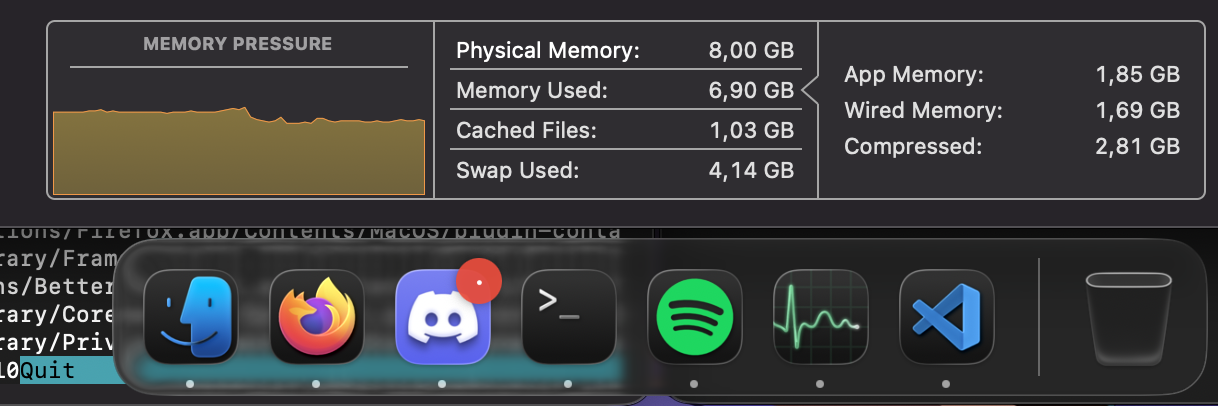 8 GB doing just fine with a three memory hungry apps at once
This is because macOS does a terrific job at balancing physical memory with swap, which has at times made me forget I even have an 8 GB machine. I’ve even managed to process >2 GB satellite imagery on this thing, that’s nothing short of impressive!
Speakers
The speakers on this thing absolutely blew me away the first time I tried them. Every laptop I ever tested, be it a cheap Chromebook or a flagship gaming one with jet fans, they all sounded equally terrible. Puny, unclear in the mid-ends, with a lackluster volume. The MacBook speakers somehow managed to sound like you are playing music from a 50 cm wide speaker - the bass is absolutely outstanding!
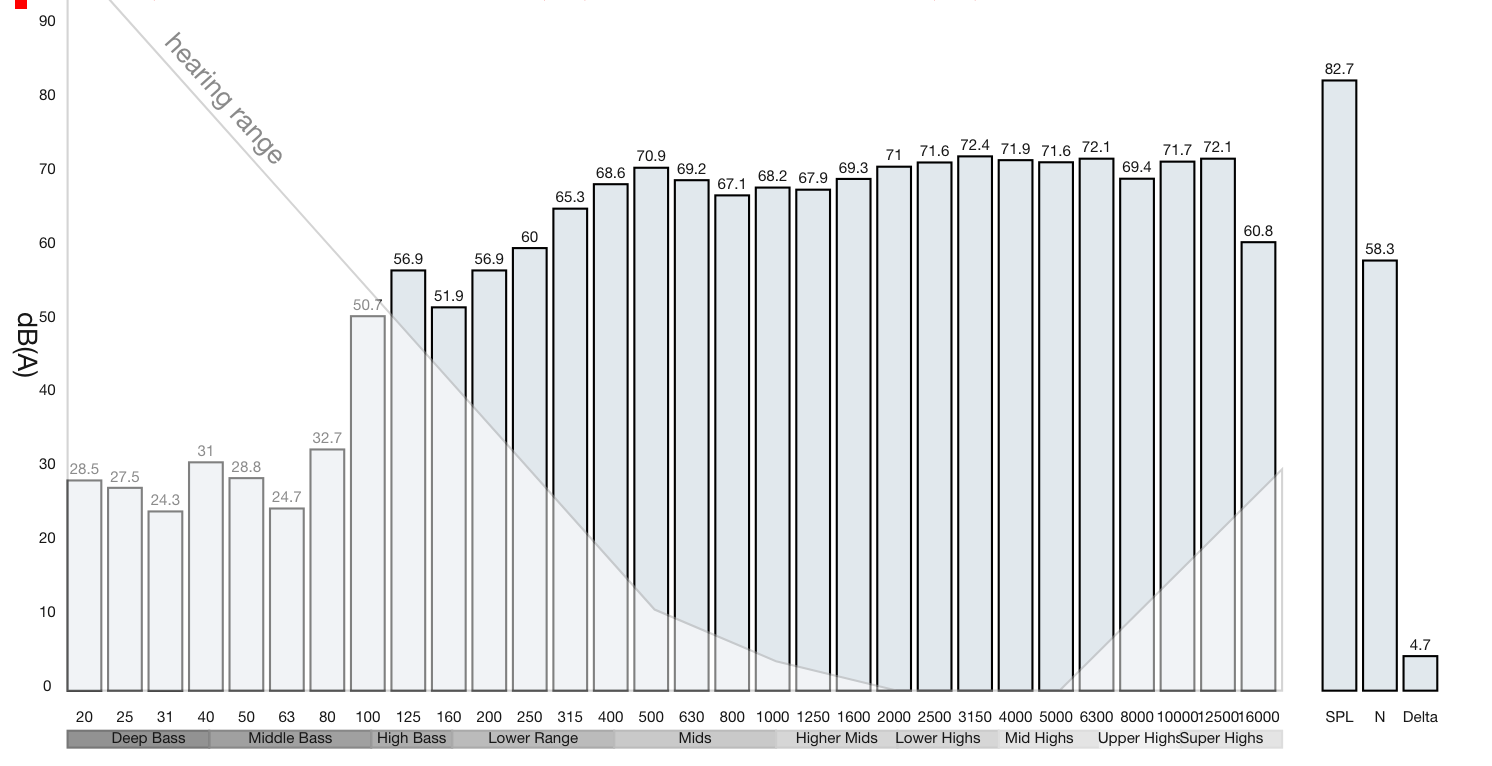 Speaker response chart sourced from NoteBookCheck
Build quality
A part of why the speakers sound so good is the outstanding build quality. Apple prides itself in making its products feel premium, it shows with this device - there is no flex anywhere, the hinge is super stable, the haptic touchpad is just a cherry on top.
I went out to try the newest laptops at a showroom, the Apple trackpad consistently beat them all. Haptics are just too good man! Dell might be the only competition with their haptic trackpads, the showroom sadly didn’t have any such models. I really hope they become more commonplace in the Windows market.
The bad
## macOS
I wanted to put this in the “Good” section, I really did. Let me explain:
I’ve always had a fear of macOS because of the fundamental Apple ideology: Security by limitation. As an example, IOS can’t do a lot of things just for the sake of security. On my desktop, I have switched over to Linux years ago because I craved the low-level access that Linux gives - you can troubleshoot right at the root of the issue instead of downstream with several obfuscations in place. I was worried that macOS would be limited and therefore more difficult to troubleshoot, which did end up being true but only to an extent.
Using Bash as the primary shell already removes a lot of friction, as it means that the vast majority of commands are POSIX-compliant. Another thing that made it easier is that it is based on BSD - the /dev paths are all the same
Even though most / paths are the same, Apple has opted into using /Users/
instead of /home/user. Why they would do this is a question that none can fathom to answer.
Even though there is low level access, it is still obfuscated by Apple shenanigans - coming from Linux, it feels extremely strange: A lot of the base commands and paths are the same, but the output is Apple-specific and very strange or difficult to interpret. For example, the familiar dmesg command has a different syntax and - compared to Linux - garbled output. Another example is Mach-O headers with the .dylib files, why would they create a custom standard instead of the commonly used .so files?!
There have been a few more annoyances which have driven me nuts on occasions. I will list a couple of them here:
1. No NTFS support
I have several drives which have to use NTFS (as I need symlinks and Windows compatibility), which I can’t use at all with macOS because it doesn’t natively support writing to NTFS at all! There is community support with FUSE drivers, but it is incredibly finicky to get to work - I tried my best to do install it, so it automatically mounts as FUSE instead of the native RO driver, but sadly couldn’t crack it
2. Poor cross-compatibility
Using macOS is a double-edged sword. A lot of apps create native very well polished macOS versions, but those which don’t you usually have no real way to get running on it. As an example, I use a satellite tracking software called Orbitron. It only has a version available for Windows, on my Linux desktop I can use it just fine with Wine - it launches and works just as well as a native app would. Even though Wine is also available on macOS, the full-screen setting and window scaling in general makes it freak out and make the whole laptop freeze up. Then there’s also the complete lack of Proton, which I really don’t understand given it is just Wine with extra steps.
Yes I know CrossOver exists, but it is a paid solution which hasn’t worked all that well in my experience. It is also insanely slow!
3. Command vs control
Using a standard desktop and trying to use standard shortcuts like CTRL+C to cancel a command is a pain on macOS. Some features work with command, others with control, some aren’t implemented at all. Even the hardware layout is annoying, that Apple has decided that what EVERY keyboard has as the control key, they will make the bloody Globe key to bring up an Emoji selector!!!
I have ended up rebinding the macros to be more convenient: ‘Command’ on the very left acting like the ‘Control’ on my desktop, the ‘Control’ key next to it as the terminal actually does need the control key for CTRL+# keybinds. This made me press Fn on my desktop keyboard when working in a terminal more times than I can count. I can not understand why Apple would make even the keyboard layout proprietary.
4. Gatekeeper
This stupid thing. macOS’s AV solution which blocks any and all apps which don’t have an ID-validated subscription-based signature. I did some development for SatDump to get it to work on macOS, every time I rebuilt the app I had to do the tedious journey of System Settings > Security > Gatekeeper > Allow app > Scan my fingerprint > ‘Yes, open anyway’
That is 5 steps and a fingerprint scan!!! I wouldn’t be writing this if it weren’t for the fact that there is no way to disable it! Even Windows SmartScreen (which is already less annoying as it only has two steps to proceed) is fine as you can just disable it. Do better, Apple!
Storage
While it makes the laptop significantly more efficient, having soldered storage it is a huge fumble if you intend to use the laptop long-term. I got the 512 GB version, it didn’t take long for me to start rationing storage space. If I were to use this laptop for uni, I would 100% have to invest in an external SSD, which is incredibly inconvenient when on normal laptops you can just replace the SSD with a bigger model. I feel sorry for people who got the 256 GB version.
## Non-180° hinge
The hinge, while built incredibly well, only opens up to 135°. This has been an inconvenience in a few cases where I was travelling and wanted to put my legs up and place the laptop on them. In such cases the screen always pointed just slightly too low to be comfortable. I acknowledge that this is very nitpicky, however.
The ugly
The screen
I’ve been incredibly torn on the screen. The color reproduction is absolutely incredible, the sharpness is exceptional at 225 PPI. However, I have one chief complaint which made the experience incredibly poor: The gloss.
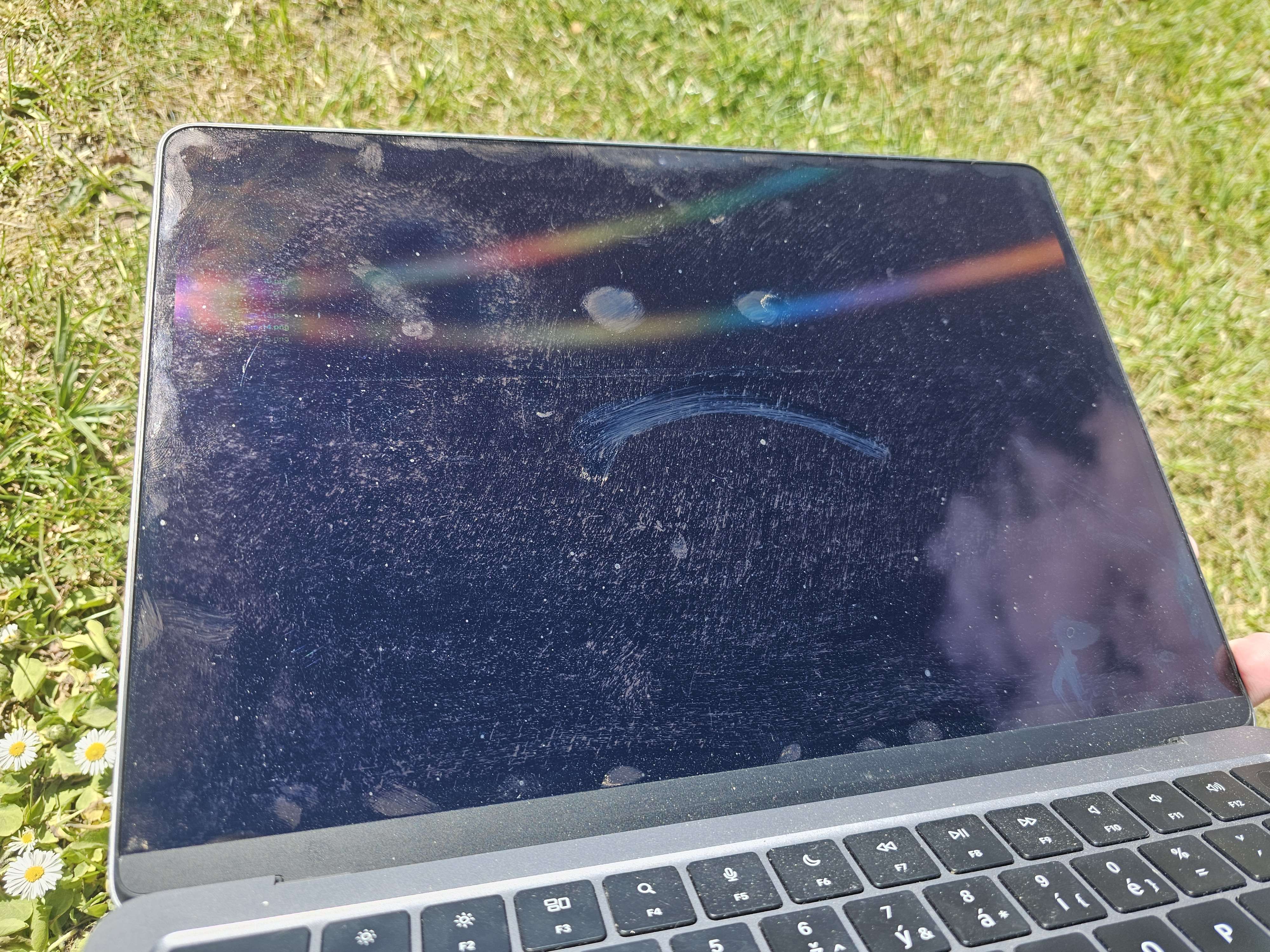 The amount of smudges accumulated from a couple of days of regular usage.
While giving the screen outstanding color reproduction when indoors, the laptop falls on its knees the moment you step outside or have any light source anywhere near the laptop. The screen is incredibly easy to smudge, as little as a small bump ends up leaving a large streak on the screen. To add insult to injury, it is also incredibly difficult to clean - you just end up smudging the streak across the screen instead of cleaning it off.
The smudges are also incredibly reflective, even more than the already insanely reflective Liquid Retina display. This makes using the laptop in sunny conditions painful at best, damn near impossible at worst.
“Just don’t touch the screen, it’s not that hard!”
You will end up touching it even if just on accident when opening the lid, but the issue is not limited to fingerprints: Specks of dust appear to stick to the screen - the layer of gloss acts like a glue making it impossible to just swipe off.
Thermals
Another feature which might be very good for indoors and day-to-day use is the lack of cooling fans, as it makes the laptop usable in a dead silent room without it being awkward.
People with gaming laptops which sound like jet engines are the most obnoxious bunch on Earth
Apple has deemed the chipset efficient enough to be able to use the laptop body as a big ‘ole heat sink, but a heat sink is just that - a place where heat is stored. Actual cooling wholly depends on natural heat dissipation, which is a terribly slow process that warms the entire laptop up. This makes the body reach outrageous temperatures when under load, the same body you just so happens to be touching when using it.
I deal with SDR in my free time, which involves a decently sized sustained load while outside. The laptop has managed to damn-near burn me on more than one occasion, but the issues aren’t even limited to load! As long as it is under sunlight, regardless of the workload, it WILL overheat.
It is also worth pointing out that these issues make the laptop significantly throttle back its performance to not cook itself to death. This cripples the M-chipset to be horribly slow. And by the time it is throttling, the whole body is well above 50 °C. At that point which is hotter than is comfortable to just touch - much less hold!
Verdict
While using the laptop was very pleasant owing to the Apple polish™, the drawbacks ultimately make it a machine not suitable for my personal use case. A lot of these affect the common person as well though, hence why my final verdict is not great, not terrible. It can best be summed up by the label “business laptop” - it does perfectly fine in an office setting, will get you through anything you throw at it with ease. “High-school laptop” is also a decent label in my opinion as it is perfectly usable for your occasional presentation or homework, but I wouldn’t go as far as calling it a great option for students given the storage limitations.
If all the work you do can be done inside, and you can adjust to the Apple software design choices, it is a very comfortable machine which will do you wonders. However, if you do any amount of work outside or live in a hot country, please save yourself the third degree burns and get a laptop with a fan instead.
This closing quote has no relation to the review, I just saw it online and thought it was funny. Perk of writing your own stuff.
“Give a man a fish, you feed him for a day. Give a man a fishing rod, he’ll wonder how to stir soup with it”